Every client links the wc-api library rather than talking to the server directly. That gives each of them the same caching, sync, and login behavior, and it means a quantity is read-only in every one of them: the sensors own that number. Pick the client that fits the job; they stay in step with each other.
Desktop
Nightly buildsThe most complete client and the one to reach for at a workstation. A native application for Linux, macOS, and Windows with full create, edit, and delete across parts, projects, BOMs, inventory, production orders, distributors, and users.
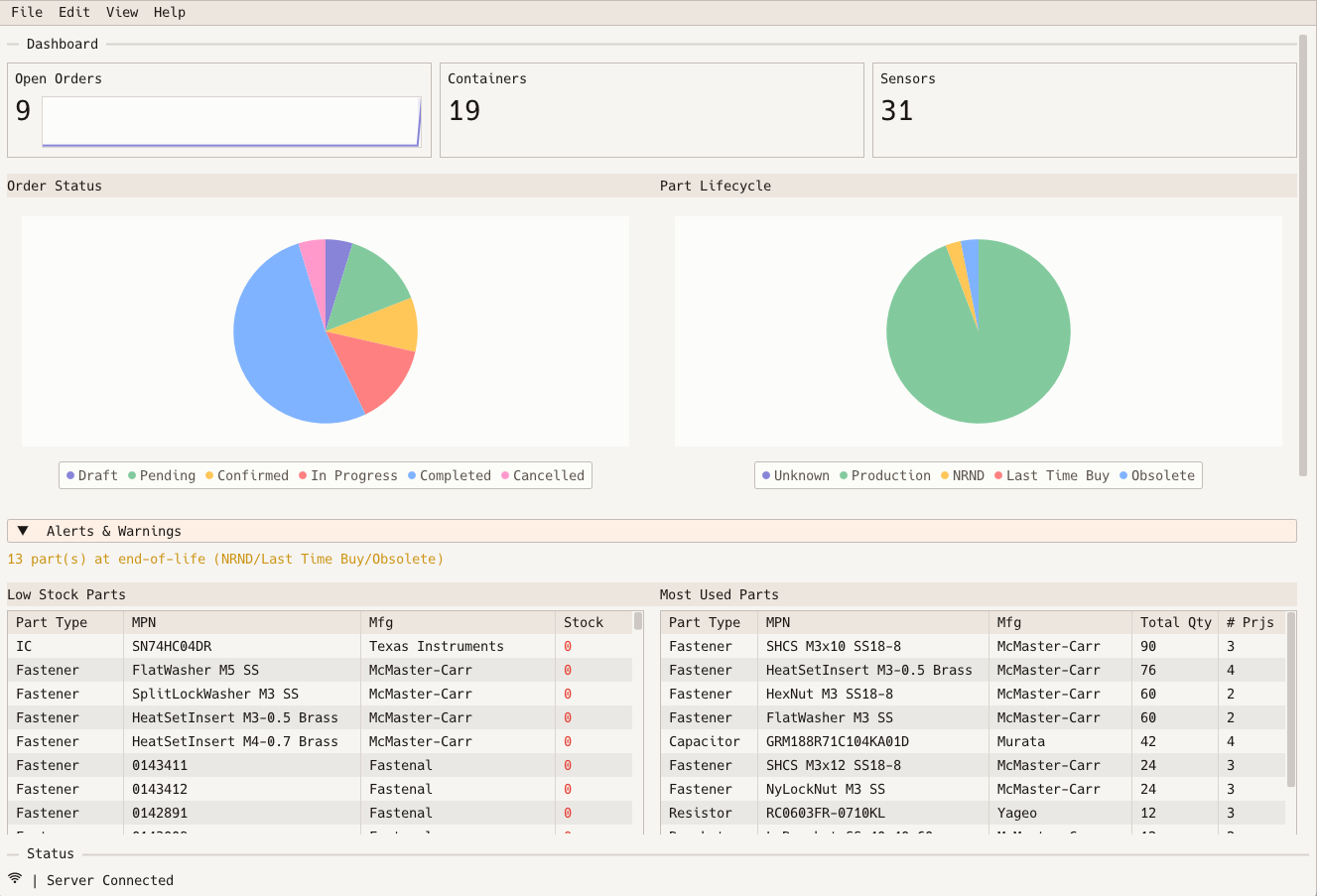
- Dashboard: open orders, container and sensor counts, lifecycle and order status charts, stale-sensor and end-of-life alerts, low-stock and most-used tables
- Parts: part types with their custom fields, parts, lifecycle, alternates, distributor pricing
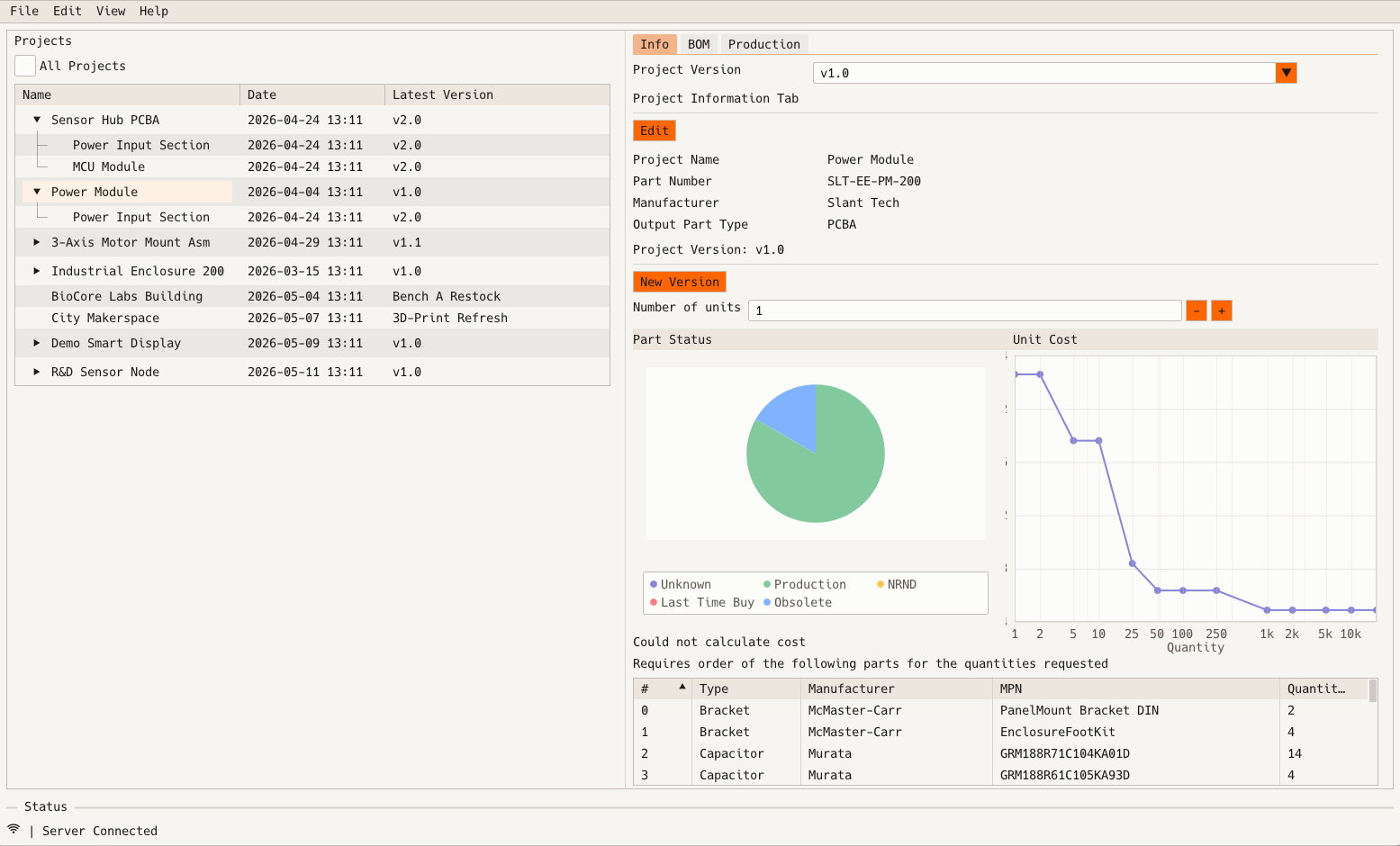
- Projects: projects and versions, BOMs, sub-projects, unit cost versus quantity, what to order for a build
- Inventory: containers as a sensor grid, sensor assignment and calibration
- Orders: production orders, sources, status changes, produced units
- Distributors: distributor settings, field mappings, manual sync
- Users: user and role administration
- CSV import for parts and BOMs; full download on first connect, then incremental sync; a local cache for a fast start
Receive parts into a bin
In Inventory, pick a container and its grid of sensor cells appears. Right-click an empty cell and assign a part. The server sends the assignment to the controller, the bin starts reporting, and the cell shows the part and its measured count from then on.
Define your own catalog
In Parts, create a part type and declare the custom fields it carries. Add parts with a manufacturer and manufacturer part number, then edit them in place. Each part's tab also shows which sensors hold it and every distributor's price breaks for it.
Plan a build
In Projects, choose a version and enter how many units you want. The Info tab shows unit cost against quantity from distributor price breaks, and a table of the parts you are short for that many units. The BOM tab lists every line.
Run a production order
In Orders, create an order from a source and add project-version lines with quantities. The status dropdown offers only the transitions the server allows, from draft through confirmed and in progress to completed, and marking produced units complete advances the order for you.
Keep pricing current
In Distributors, enable a plugin, choose which part types it covers, and trigger a sync. Discover the supplier's fields and map them onto your custom fields with an assisted wizard that suggests matches for you to confirm.
Watch the floor
The Dashboard opens after login: open orders with a ninety-day trend, container and sensor counts, order status and lifecycle charts, stale-sensor and end-of-life alerts, a low-stock table with an adjustable threshold, the most-used parts, and the latest completed units.
Phone
BetaFor iPhone and Android. The app for the person standing in front of the shelf: scan a label, find the part, see how many are left and where, and put it in a bin.
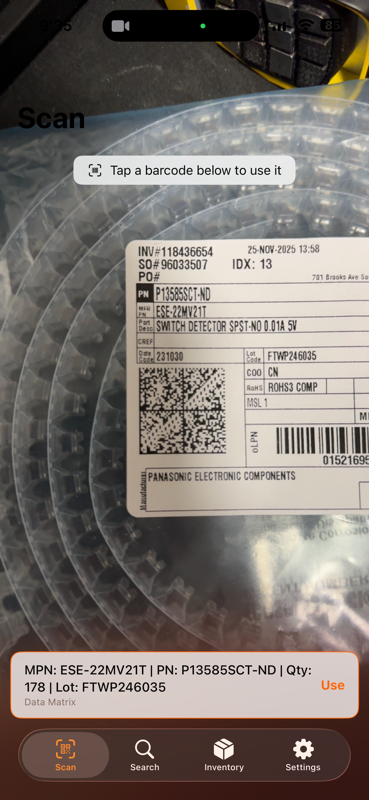
- Scan: live camera scanning of barcodes, QR codes, and Data Matrix labels, with manual entry
- Search: find parts by manufacturer part number, filtered by type
- Inventory: browse containers and their sensors; register, unregister, or reset a sensor
- Detail: identifiers, lifecycle, measured quantity, distributor pricing, custom fields
- Android browses offline from its local cache and syncs when reconnected
- iOS 17 or later; Android 12 or later
Scan a label
Point the camera at the barcode, QR code, or Data Matrix on a reel, bag, or box. Distributor labels encode the manufacturer part number, order quantity, and lot, and the app decodes them and looks the part up in warecache. Type a part number by hand when there is no label.
Put it in a bin
From the part, open Inventory, choose a container and an empty sensor, and register the part to it. The bin begins reporting the measured quantity. Unregister or reset a sensor from the same screen when a bin is repurposed.
Check what is left
Search by manufacturer part number, filtered by type. The detail screen shows the quantity summed across every bin holding the part, its lifecycle, distributor pricing, and custom fields. Android keeps all of this readable offline and syncs when the network returns.
iPad
BetaThe production-floor client. Everything the phone app does, plus the production order workflow, dashboards, and the ability to keep working when the network does not.
- Orders: review production orders and move them through their states
- Dashboard: cost and quantity, lifecycle, and order status charts with alerts
- Parts and Containers: browse by type; the container grid with sensor register and reset
- Projects and Distributors: read-only reference
- Offline mode: reads come from the local cache, writes wait until reconnected
- Multiple server profiles, each with its own cache
- Face ID or Touch ID app lock over the login
- Notifications for new orders, status changes, low stock, and lost connections
- iPadOS 18 or later
Work an order on the floor
Open Orders to see what is queued, confirmed, and in progress, then move an order to its next state as work happens. A notification arrives when a new order lands or an order changes status, so nobody has to walk back to a desk.
Scan at the station
Scanning is laid out for a mounted iPad. Read a label to find the part, then register it to a sensor in the container in front of you. Parts and Containers give the same grid view as the desktop, read-only apart from register and reset.
Keep going without the network
Reads come from a local cache with an expiry, and write actions are simply disabled until the connection returns. Keep several server profiles, each with its own cache, and lock the app behind Face ID or Touch ID.
Command Line
In developmentA scriptable client for automation and CI pipelines. It signs in with an API token, a password, or your identity provider's device flow, and exposes the same resources as the API as commands.
- Planned command groups: parts, projects, BOMs, sensors, containers, distributors, production, changelog, users, server status
- API token management works today; the remaining commands are being built out
- Stateless by design: nothing is stored between runs except the token you give it
$ wcli --server https://wc.example.com token list
LABEL        CREATED      EXPIRES
ci-build     2026-08-14   2027-08-14
kicad-lib    2026-07-02   never