warecache is launching on Crowd Supply. Sign up for launch updates →

Powerful Features for Modern Inventory Management

Discover how warecache replaces manual counting with measured quantities, and keeps parts, projects, and production visible from the desktop to the floor.

Smart Sensor Integration

Weight and switch sensor bins measure what is inside them and report it through a PoE container controller. Quantities in warecache are always the measured value, so there is nothing to count by hand and nothing to type in.

  • Weight bins count parts by calibrated weight; switch bins detect one item per slot
  • Real-time updates from up to 64 bins per container controller
  • Low-stock alerts with an adjustable threshold
  • Bins carry their own identity and move between cells without reconfiguration
  • Open sensor interface and KiCad template for custom sensors
Explore the hardware →
142 M3 Screws
0 M4 Screws Empty
89 Washers
12 Nuts Low
234 Resistors
67 Capacitors
8 LEDs Low
156 Diodes

Real-time Dashboard

Monitor your entire inventory at a glance. Track stock per container and per sensor, see usage over time, and get alerts for low stock, stale sensors, and end-of-life parts.

  • Live inventory status per container and per sensor, with history
  • Low-stock, stale-sensor, and end-of-life alerts
  • Full changelog of every change, with a viewer in the desktop client
  • Desktop, phone, and tablet clients kept in sync
Inventory Overview
Stock by Category
Hardware Electronics Consumables
Usage Trend (7 days)
MonTueWedThuFriSatSun
1,247 Total Items
3 Low Stock
Top Usage
Screws
Resistors
Washers

Advanced Analytics

Understand what your inventory costs and where it is headed. warecache rolls build cost up from BOMs, tracks distributor price breaks, and flags parts approaching end of life.

  • Automatic build-cost rollup from BOMs onto finished parts
  • Unit cost versus quantity from distributor price breaks
  • Lifecycle tracking: production, NRND, last time buy, obsolete
  • Usage history per part, with low-stock and most-used tables
M3 Screws - Usage History Last 30 days
200 150 100 50 0
W1
W2
W3
W4
Low-Stock Threshold

Project & BOM Management

Organize your inventory with project and Bill of Materials (BOM) management. Track parts across multiple projects, manage versions, and see at a glance what is in stock for the next build.

  • Hierarchical projects with sub-projects, expanded or treated as a single part
  • Version control for projects and BOMs
  • Alternate (interchangeable) parts
  • Cross-project part sharing and stock visibility
Project: Controller Board v2.1 Active
Component Qty Stock Status
ATmega328P 1 12 OK
10k Resistor 8 234 OK
100nF Capacitor 4 3 Low
USB-C Connector 1 0 Out
4 components 2 need attention

Production Orders

Turn a project version into work on the floor. A production order lists what to build, shows which parts you are short, and moves through a clear set of states from draft to completed.

  • Orders from any source, with lines targeting specific project versions
  • Deficit parts listed before you start
  • Produced units recorded as the order advances
  • Managed from the desktop client or the iPad app on the production floor
  • iPad notifications for new orders and status changes
Production Orders 3 Open
Order Project Qty Status
PO-0142 Controller Board v2.1 25 In Progress
PO-0143 Power Module v1.0 10 Confirmed
PO-0144 Sensor Node v1.0 50 Pending
PO-0139 Motor Mount v1.1 12 Completed
PO-0144 short 3 parts 85 units in progress

Security & Access Control

Self-hosted by default, so your inventory data stays on your network. People sign in with a password or through your identity provider, tools use API tokens, and every controller proves who it is with a certificate.

  • OIDC single sign-on with group-to-role mapping
  • Roles: Guest, Default, and Admin
  • API tokens for scripts and integrations
  • Revocable sessions and Argon2 password hashing
  • Container controllers authenticate with mutual TLS certificates, no device passwords
AUTH warecache server
users      password or OIDC single sign-on
roles      Guest < Default < Admin
tools      API tokens
sessions   revocable, stored server-side
devices    client certificate, mutual TLS
transport  TLS to the API and the MQTT broker

API, Plugins & Integrations

Everything in warecache is reachable through an authenticated REST API and the wc-api client library, the same library the desktop and mobile clients are built on. Python plugins pull distributor pricing and stock on a schedule.

  • REST API with a live OpenAPI description
  • wc-api library: Rust core with C/C++ and JNI bindings
  • Python distributor plugins with configurable field maps
  • CSV import for parts and BOMs
Tools and integrations →
GET /api/v1/parts/Fastener
[
  {
    "ipn": 1042,
    "mpn": "SHCS M3x10 SS18-8",
    "manufacturer": "McMaster-Carr",
    "quantity": 142,
    "lifecycle": "Production"
  },
  {
    "ipn": 1043,
    "mpn": "HexNut M3 SS18-8",
    "manufacturer": "McMaster-Carr",
    "quantity": 12,
    "lifecycle": "Production"
  }
]

Screenshots

The desktop client and the phone app as they are today.

Desktop: Dashboard

The first view after login. Open orders with a ninety-day trend, container and sensor counts, order status and part lifecycle charts, an alert for parts at end of life, and the low-stock and most-used tables.
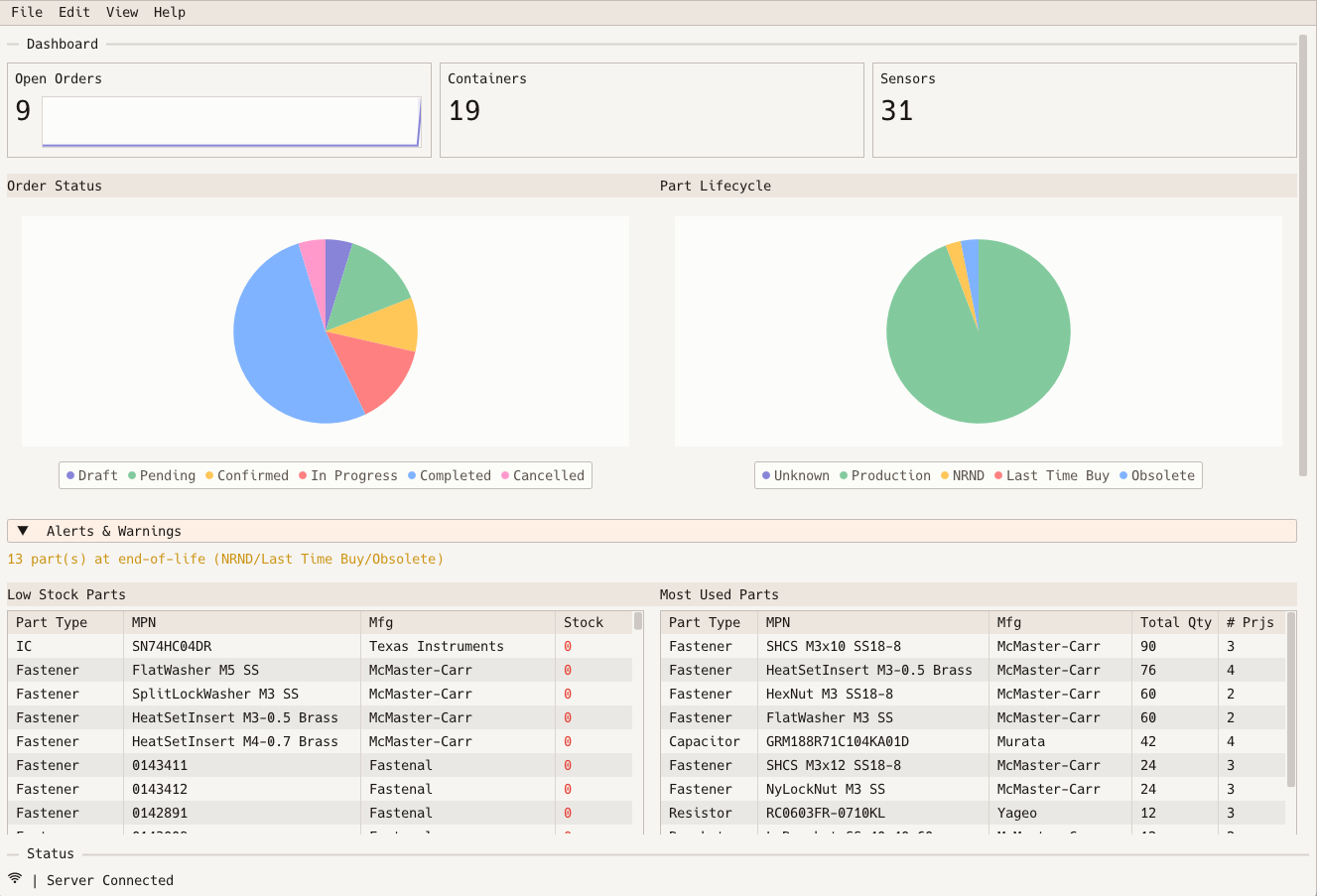
warecache desktop dashboard with open order, container, and sensor counts, order status and part lifecycle pie charts, an end-of-life alert, and low-stock and most-used part tables

Desktop: Projects

The project tree with sub-projects and versions on the left. On the right, the selected version's part status, unit cost against quantity from distributor price breaks, and the parts that must be ordered to build the number of units entered.
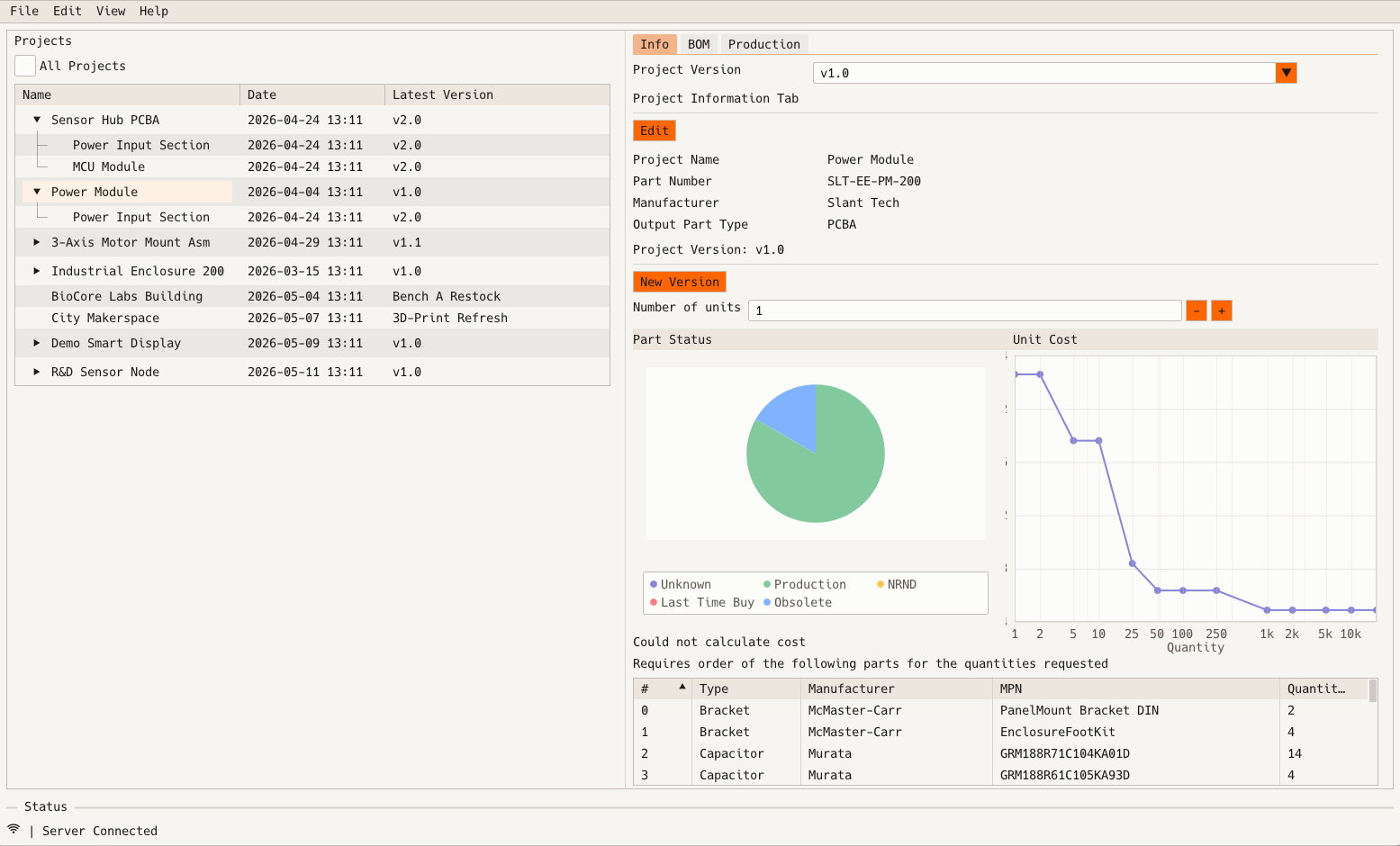
warecache desktop project view with a tree of projects and sub-projects, a version selector, part lifecycle pie chart, unit cost versus quantity curve, and a list of parts that must be ordered

iPhone: Scan

Point the camera at a reel or bag label. The Data Matrix code carries the manufacturer part number, quantity, and lot, and the app decodes it, looks the part up, and offers to put it in a bin.
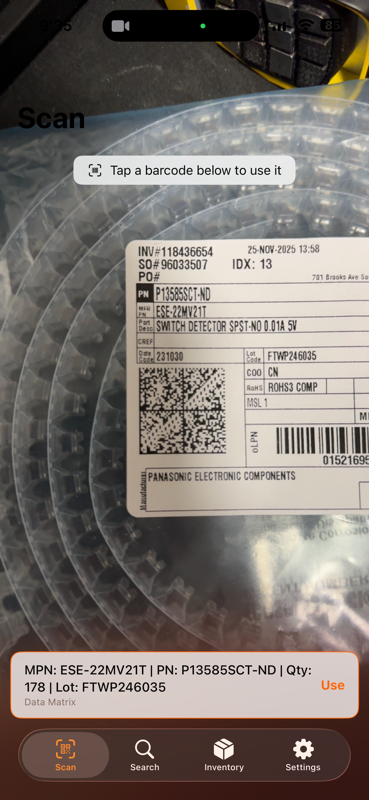
warecache iPhone app scanning a Data Matrix code on a component reel label and showing the decoded manufacturer part number, quantity, and lot